Key takeaways
- Format: Lifestyle landscape with store badges – a classic app install layout.
- Best for: Consumer app install campaigns targeting cold audiences.
- Hook: A breathtaking view plus a promise: your next trail.
- Reuse it: Use your category's most desirable scene, a 3–5 word headline and both store badges.
Available sizes
What is a lifestyle ad?
A lifestyle ad shows the product being used in a real setting by the kind of person who buys it. Instead of listing features, it sells the feeling or outcome of owning the product, which makes it a strong fit for fashion, home, travel and wellness brands.
See all lifestyle ads →Why this lifestyle ad works
- 01
Desire before features
The stunning landscape makes viewers want to be there before they know what the app does.
- 02
Clear next step
Store badges are universally recognised CTAs that remove any doubt about what to do.
- 03
'Next' implies habit
'Find your next trail' suggests an ongoing journey, encouraging repeat use.
- 04
Low cognitive load
Only four elements – logo, headline, line, badges – make it readable in a glance.
Full creative breakdown
Who this ad targets
Broad cold audiences in the US who enjoy the outdoors but don't use AllTrails yet: weekend walkers, day hikers, families, travellers and people looking for autumn activities. Badges for both iOS and Android show it's aimed at all smartphone users. Likely used in prospecting campaigns with outdoor, travel, fitness and nature interests aged 22–60, especially in autumn. It also suits re-engagement of people who previously uninstalled.
Copywriting analysis
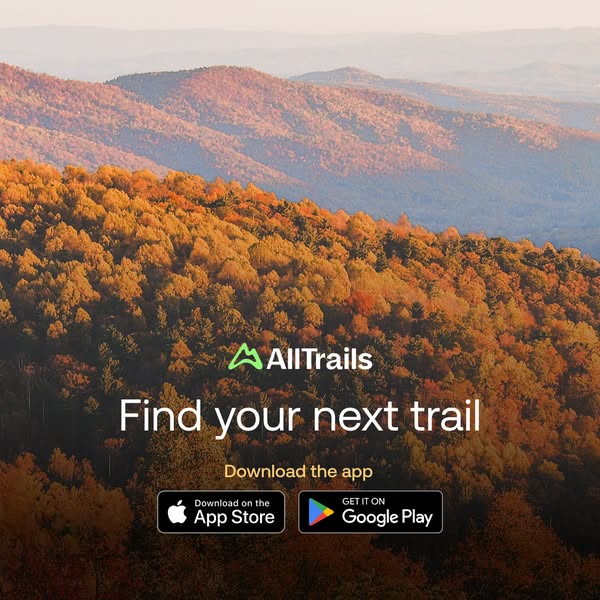
'Find your next trail' is short, personal ('your') and forward-looking ('next'). It assumes the viewer already hikes, which flatters and includes them. 'Download the app' in a contrasting gold colour turns the store badges into a clear call to action. There's no feature list, price or urgency, which keeps the ad simple and broad – appropriate for awareness and install campaigns, where the store page does the detailed selling. Its universality is the point: it can run all season with only the background photo swapped.
Visual design
The golden-hour photo provides a warm gradient from orange foreground to pink and lavender hills. Text is placed in the lower half over darker trees for contrast. The gold 'Download the app' line ties into the landscape colours. Black store badges add contrast and are instantly recognisable. Centre alignment and generous space make it balanced and calm.
How to adapt this template for your brand
- Choose your category's most aspirational scene, ideally with warm natural light.
- Place your logo and a 3–5 word headline over the darkest area.
- Add a short 'Download the app' line in an accent colour pulled from the photo.
- Add official App Store and Google Play badges, following each store's guidelines.
- Keep everything centred and leave the top of the image clean.
Tips for hiking ads on Meta
Works for Meta Feed and Google Display and App campaigns. In Meta app install campaigns, the platform adds its own install button, so test a version without badges to avoid duplication. On Google, supply the image without badges and let the CTA be generated. Use official badge artwork and keep minimum sizes for legibility. Rotate seasonal backgrounds to fight ad fatigue.
About this creative
A square app install ad for AllTrails. The full background is a warm, golden-hour landscape of rolling hills covered in autumn forest – orange, gold and rust treetops in the foreground, fading to pink and lavender ridgelines and a hazy sky behind. The lower half holds all of the text, centred: the green and white AllTrails logo, a large white headline 'Find your next trail', a smaller yellow-gold line 'Download the app', and the standard black 'Download on the App Store' and 'Get it on Google Play' badges side by side. There's no phone, no UI and no offer. The ad trusts the scenery to create desire and the badges to make the next step obvious. It feels calm, inviting and seasonal, and works for both brand awareness and direct app installs.
Meta ad · 338 × 600 · Hiking
AllTrails App Install Ad: Find Your Next Trail
This square AllTrails ad is a classic app install creative: a sweeping autumn hillside, a short headline, 'Download the app' and both store badges. It is a lifestyle format that relies on scenery and clarity rather than features – an easy, reusable template for any consumer app's install campaign.
Added
All brand names and logos are property of their owners. Adplaylist is not affiliated with or endorsed by these brands.
Details
Ad copy
Primary text
Your next favorite hike is out there. Download AllTrails for free to find trails near you with maps, photos and reviews from millions of hikers.
Description
Free on the App Store and Google Play.
On-image text
AllTrails | Find your next trail | Download the app | Download on the App Store | Get it on Google Play
Headline ideas for this template
- 1Your next favorite hike is waiting
- 2Find trails near you – free
- 3Every great view starts with a trail
- 4Discover hikes near you in seconds
- 5Get outside: find your next trail
Meta image ad specs
| Placement | Ratio | Size (px) |
|---|---|---|
| Feed | 1:1 or 4:5 | 1080×1080 / 1080×1350 |
| Marketplace | 1:1 | 1200×1200 |
| Messenger inbox | 1:1 | 1200×1200 |
| Stories & Reels | 9:16 | 1080×1920 |
This template is 1:1. Request 4:5 or 9:16 to cover all placements.
Browse similar by tag