Key takeaways
- Format: Feature callout – phone UI showing the feature in its real context.
- Best for: Apps promoting offline access, sync, or reliability features.
- Hook: Two short commands: 'Download the map. Go offline.'
- Reuse it: Show a tiny real-world cue (SOS, no Wi-Fi) next to your feature working anyway.
Available sizes
What is a feature callout ad?
A feature callout ad is a static image that shows a single product with short text labels pointing to its key features or benefits, usually joined to the product by thin lines. It explains several selling points at a glance without a long caption, which is why it's common for supplements, skincare, electronics and kitchenware.
See all feature callouts ads →Why this feature callouts ad works
- 01
Micro-proof in the status bar
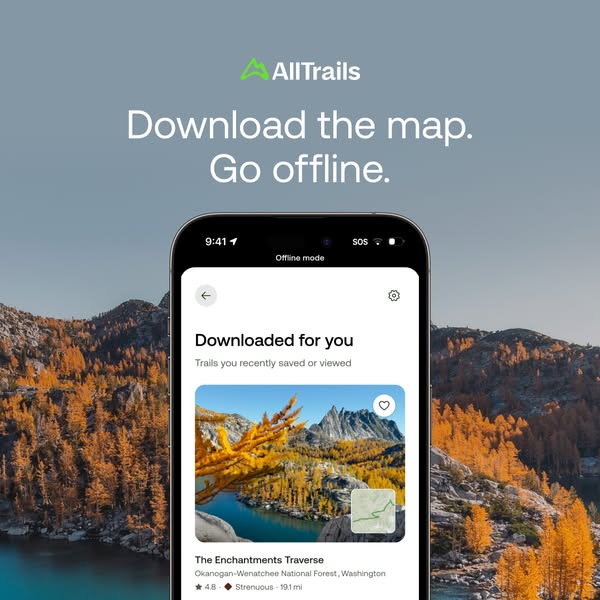
'SOS' and 'Offline mode' quietly prove the app works without coverage.
- 02
Aspirational example
The Enchantments is a bucket-list hike, so the example sparks desire as well as trust.
- 03
Instruction as headline
Two short commands explain how the feature works in four words.
- 04
Scenery matches the problem
Remote alpine terrain is exactly where offline maps matter, reinforcing the need.
Full creative breakdown
Who this ad targets
Hikers and backpackers who visit remote areas – national forests, wilderness and mountains – where phone coverage is unreliable. It also targets safety-conscious and planning-oriented hikers, plus free AllTrails users who could upgrade to a paid plan to unlock offline maps. Likely aimed at US outdoor audiences aged 25–55, especially in the Pacific Northwest and mountain states, and lookalikes of engaged users.
Copywriting analysis
'Download the map. Go offline.' is two short imperative sentences that double as instructions. The full stops give a confident rhythm. It doesn't mention fear or getting lost; the UI does that implicitly with 'SOS'. The app copy, 'Downloaded for you', adds a sense of service – the app has done the work for you. Real trail details (rating, difficulty, distance) add credibility and show users the depth of information available offline. The trail choice also hints at the content quality users get, adding a second reason to download.
Visual design
The image splits into a cool blue sky top and warm golden landscape bottom, giving strong contrast for the white headline. The phone is centred and rises from the bottom, framed by peaks on both sides. The white app screen stands out against the yellow larches. A small photo inside the trail card echoes the background scene, creating visual consistency. The layout is clean and symmetrical.
How to adapt this template for your brand
- Choose a feature that solves a real-world constraint (no signal, no time, no Wi-Fi).
- Capture the UI with a visible cue of that constraint (e.g. 'SOS', 'Offline').
- Feature a famous, aspirational example inside the screen.
- Write a two-step instruction headline describing how to use the feature.
- Use a background that shows where the constraint happens.
Tips for hiking ads on Meta
Square works on Meta Feed and Google Display; create a 9:16 version with the headline above and the phone larger for Stories. For upgrade campaigns, add the tier name in the primary text. Geo-target mountain and national park regions and run before peak hiking season. A Reel showing the download and switching to airplane mode would demonstrate the feature well.
About this creative
A square feature ad for AllTrails offline maps. The upper half is a calm blue-grey sky with the green AllTrails logo and a two-sentence white headline: 'Download the map. Go offline.' The lower half shows a golden alpine landscape of larch trees in full autumn yellow, granite peaks and a turquoise lake – the kind of remote place where signal disappears. A phone rises from the bottom centre. Its status bar shows '9:41' and 'SOS', and a strip reads 'Offline mode'. The screen title is 'Downloaded for you – Trails you recently saved or viewed', followed by a trail card with a photo of a jagged peak and larches, a small map thumbnail, and the details 'The Enchantments Traverse – Okanogan-Wenatchee National Forest, Washington – ★ 4.8 · Strenuous · 19.1 mi'. A heart icon shows it's saved. The ad demonstrates exactly how offline maps work and highlights a famous, aspirational trail as the example.
Meta ad · 338 × 600 · Hiking
AllTrails Ad: Download the Map. Go Offline.
This square AllTrails ad promotes offline maps with a phone showing 'SOS' instead of signal and a 'Downloaded for you' list featuring The Enchantments Traverse. It is a feature-callout format where tiny UI details prove the claim – a reusable template for any offline, sync or reliability feature.
Added
All brand names and logos are property of their owners. Adplaylist is not affiliated with or endorsed by these brands.
Details
Ad copy
Primary text
No signal on the trail? No problem. Download maps with AllTrails and navigate offline – your saved and recently viewed trails are ready when you are.
Description
Offline maps for every trail you save.
On-image text
AllTrails | Download the map. Go offline. | 9:41 | SOS | Offline mode | Downloaded for you | Trails you recently saved or viewed | The Enchantments Traverse | Okanogan-Wenatchee National Forest, Washington | ★ 4.8 · Strenuous · 19.1 mi
Headline ideas for this template
- 1No signal? Your trail map still works
- 2Save it now, hike it offline
- 3Offline maps for the wild places
- 4Download before you go
- 5Signal ends, the trail doesn't
Meta image ad specs
| Placement | Ratio | Size (px) |
|---|---|---|
| Feed | 1:1 or 4:5 | 1080×1080 / 1080×1350 |
| Marketplace | 1:1 | 1200×1200 |
| Messenger inbox | 1:1 | 1200×1200 |
| Stories & Reels | 9:16 | 1080×1920 |
This template is 1:1. Request 4:5 or 9:16 to cover all placements.
Browse similar by tag