Key takeaways
- Format: Feature callout using an enlarged settings card with toggles.
- Best for: App updates, new settings, or convenience features.
- Hook: 'Pocket your phone' – an instant, physical image of freedom.
- Reuse it: Enlarge your feature's settings card, switch the toggles on, add a 'New' badge.
Available sizes
What is a feature callout ad?
A feature callout ad is a static image that shows a single product with short text labels pointing to its key features or benefits, usually joined to the product by thin lines. It explains several selling points at a glance without a long caption, which is why it's common for supplements, skincare, electronics and kitchenware.
See all feature callouts ads →Why this feature callouts ad works
- 01
Physical, visual headline
'Pocket your phone' paints a concrete picture that's quicker to grasp than 'audio guidance'.
- 02
Toggles imply ease
Two green switches show the feature is a single tap away, removing perceived effort.
- 03
'New' badge for urgency
A small badge on voice navigation makes the update feel fresh and worth trying now.
- 04
Person in motion
The runner shows the benefit in use – moving freely without staring at a screen.
Full creative breakdown
Who this ad targets
Trail runners, hikers and walkers who move quickly or need their hands free – poles, dogs, kids or photography – and don't want to keep checking their phone. Also safety-minded users who want audio alerts when they go off route. Likely targeting existing AllTrails users (to drive feature adoption) and US fitness, running and hiking interest audiences aged 22–50 across Meta and Google placements.
Copywriting analysis
'Pocket your phone, go hands-free' is two short imperatives that describe a physical action and its benefit. It avoids technical terms like 'audio cues' in the headline and saves them for the UI card. The subline, 'We've got you covered', is warm and reassuring. Inside the card, the copy is functional and specific: 'real-time directions', 'audio cues', 'auto-pause alerts'. The 'New' badge signals an update. The structure – benefit headline, reassurance, feature detail – is clear and efficient. It is a good model for update announcements that need to inform existing users and attract new ones at once.
Visual design
The dark green forest background makes the bright white card the focal point. The card is large and centred, overlapping the phone to suggest it's part of the app. Lime-green toggles and the 'New' badge echo the AllTrails brand colour. The runner in the corner adds human scale without stealing attention. White headline text sits at the top over darker foliage with good contrast.
How to adapt this template for your brand
- Identify a feature that can be represented by a toggle or setting.
- Recreate the settings card at large size with the toggles switched on.
- Add a 'New' badge if it's a recent update.
- Layer the card over a phone and a background showing someone using the benefit.
- Write a physical, action-based headline (what the user can now stop or start doing).
Tips for hiking ads on Meta
Square works across Meta Feed and Google Display. For Stories, extend to 9:16 with the runner more prominent. A short video with a voice prompt playing ('In 200 feet, turn left') would make the benefit audible on Reels. Use a feature-adoption campaign for existing users and app install for new audiences. Keep the settings card large enough to read on small screens.
About this creative
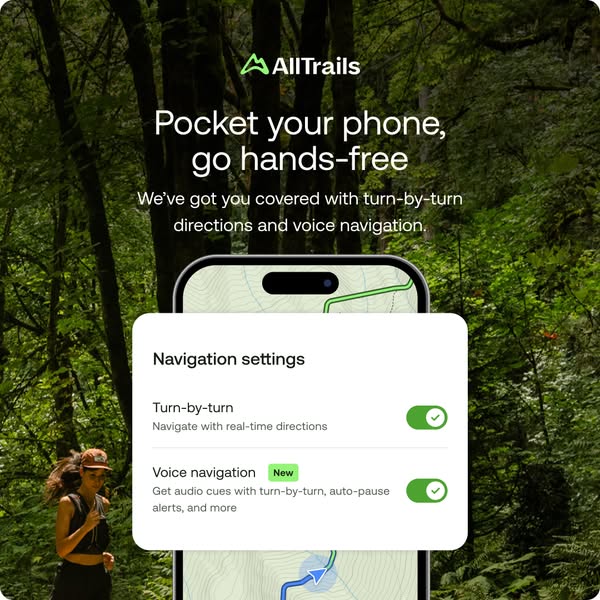
A square AllTrails ad announcing voice navigation. The background is a deep, lush green forest with tall trunks and ferns. In the lower-left, a woman in a cap and tank top runs or hikes along the trail, holding something to her chest – an everyday, in-motion moment. A phone sits centre-bottom with a map and a blue location marker peeking out. Overlaid on the phone is a large white card titled 'Navigation settings', with two rows: 'Turn-by-turn – Navigate with real-time directions' and 'Voice navigation' with a green 'New' badge and the description 'Get audio cues with turn-by-turn, auto-pause alerts, and more'. Both rows have green toggles switched on. Above, the green AllTrails logo, the white headline 'Pocket your phone, go hands-free' and a subline 'We've got you covered with turn-by-turn directions and voice navigation' complete the message. The ad turns a mundane settings panel into a clear promise of convenience.
Meta ad · 338 × 600 · Hiking
AllTrails Ad: Pocket Your Phone, Go Hands-Free
This square AllTrails ad promotes new voice navigation using a simple 'Navigation settings' card with two green toggles switched on, layered over a phone and a runner in a lush forest. It is a feature-callout format that turns a settings screen into a benefit – ideal for app updates and new toggles.
Added
All brand names and logos are property of their owners. Adplaylist is not affiliated with or endorsed by these brands.
Details
Ad copy
Primary text
Eyes on the trail, phone in your pocket. AllTrails now gives you turn-by-turn directions and new voice navigation with audio cues and auto-pause alerts.
Description
New voice navigation with turn-by-turn directions.
On-image text
AllTrails | Pocket your phone, go hands-free | We've got you covered with turn-by-turn directions and voice navigation. | Navigation settings | Turn-by-turn – Navigate with real-time directions | Voice navigation New – Get audio cues with turn-by-turn, auto-pause alerts, and more
Headline ideas for this template
- 1Hear your next turn, keep your eyes on the trail
- 2Hands-free hiking is here
- 3Let AllTrails do the talking
- 4Voice directions for every trail
- 5Stop checking. Start hiking.
Meta image ad specs
| Placement | Ratio | Size (px) |
|---|---|---|
| Feed | 1:1 or 4:5 | 1080×1080 / 1080×1350 |
| Marketplace | 1:1 | 1200×1200 |
| Messenger inbox | 1:1 | 1200×1200 |
| Stories & Reels | 9:16 | 1080×1920 |
This template is 1:1. Request 4:5 or 9:16 to cover all placements.