Key takeaways
- Format: Logo bar chart comparison that teases data from a gated report.
- Best for: B2B SaaS lead generation with reports, benchmarks and research.
- Hook: A direct question about which familiar platform is worst for bots.
- Reuse it: Replace the platforms with competitors, tools or channels your audience already uses.
Available sizes
What is a comparison ad?
A comparison ad sets the product against an alternative, such as a competitor, the old way of doing things or a cheaper option, usually in a two-column layout or table. It helps buyers who are already weighing options see quickly why this one is the better choice.
See all comparison ads →Why this comparison ad works
- 01
Curiosity gap
The question plus an unlabelled chart makes people want the exact numbers, which only the report gives.
- 02
Familiar logos
Recognisable platform icons stop the scroll and make the comparison instantly understandable without text.
- 03
Audience callout
Highlighting 'IT & Security Sector' in teal tells the right prospects this research is about them.
- 04
Clear single action
A button-shaped CTA on the image sets expectations that clicking leads to a free download.
Full creative breakdown
Who this ad targets
The ad targets performance marketers, demand generation managers and marketing directors at IT and cybersecurity companies who spend heavily on paid search and social. These people manage budgets on LinkedIn, Google, Bing and Meta and are under pressure to prove ROI. They suspect some of their clicks are fake but lack benchmarks. Running on LinkedIn, the ad can be targeted precisely by industry and job function, matching the sector named in the headline.
Copywriting analysis
The copy is a single question that does the heavy lifting. Asking 'Which ad platform has the most bot traffic' taps into a common frustration of paid media managers and invites them to guess. Naming the sector narrows relevance and makes the content feel tailored rather than generic. The call to action, 'Download the report', is specific and honest about the offer, which reduces friction for a gated asset. There is no brand pitch on the image, so it reads as useful research rather than an ad. The answer is implied visually, which rewards attention without giving the value away.
Visual design
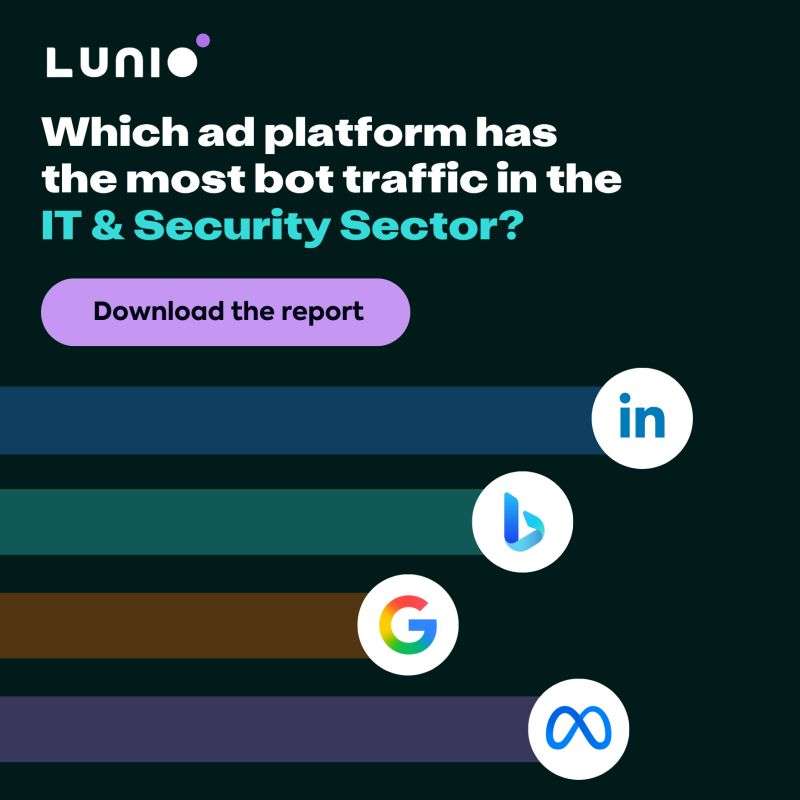
A dark background makes the white headline and coloured bars stand out in LinkedIn's light feed. The layout splits cleanly into text on top and chart below. Each bar has a distinct muted colour, while white circular badges hold the platform logos for instant recognition. The lilac pill button mirrors the purple dot in the Lunio logo, tying the CTA to the brand. Bars extend from the left edge, giving a sense of scale and motion.
How to adapt this template for your brand
- Pick a research finding your audience cares about and frame it as a question.
- Visualise the comparison as bars with recognisable logos instead of labels or numbers.
- Highlight the audience or sector in an accent colour within the headline.
- Add a button-style CTA that names the offer, such as report or benchmark.
- Make sector-specific versions of the same ad and test them against each other.
Tips for advertising platforms ads on LinkedIn
On LinkedIn, use a Lead Gen Form so prospects can download the report without leaving the platform, and target by industry, job function and seniority. Prefill fields to raise conversion rates. Create versions for other sectors with the same chart. On Google Display or Meta, the dark background stands out, but check that logos are allowed by each platform's trademark rules. Follow up downloaders with a nurture sequence that offers a traffic audit.
About this creative
This square LinkedIn ad from Lunio, an ad fraud and click protection company, promotes a downloadable report about bot traffic in the IT and security sector. The background is a near-black dark green, with the Lunio wordmark and a small purple dot at the top left. A bold white headline asks which ad platform has the most bot traffic, with 'IT & Security Sector?' highlighted in teal to call out the audience. Beneath it sits a pill-shaped lilac button reading 'Download the report'. The lower half is a horizontal bar chart made of four coloured bars, each ending in a white circle with a platform logo: LinkedIn, Microsoft Bing, Google and Meta. LinkedIn's bar is longest, implying it has the most bot traffic, followed by Meta, Bing and Google. The chart has no numbers, so the ad gives a teaser of the answer while leaving the real data behind the form.
LinkedIn ad · 338 × 600 · Advertising Platforms
Ad Fraud Report Ad Example: Lunio Platform Comparison
This Lunio ad promotes a gated report on bot traffic in the IT and security sector. The comparison format uses a simple bar chart with LinkedIn, Bing, Google and Meta logos to tease the findings. Use it as a template for lead generation with research reports, benchmarks or industry data.
Added
All brand names and logos are property of their owners. Adplaylist is not affiliated with or endorsed by these brands.
Details
Ad copy
Primary text
Bot traffic is draining IT & Security ad budgets – but not equally across platforms. Our new benchmark report reveals which ad channel sends the most fake clicks and what you can do about it.
Description
Free benchmark report for IT & Security marketers
On-image text
Lunio. Which ad platform has the most bot traffic in the IT & Security Sector? Download the report
Headline ideas for this template
- 1Is LinkedIn sending you bots?
- 2How much of your ad budget goes to fake clicks?
- 3The ad platform with the worst bot problem revealed
- 4IT & Security marketers: see your bot traffic benchmark
- 5Stop paying for clicks that never convert
Browse similar by tag