Key takeaways
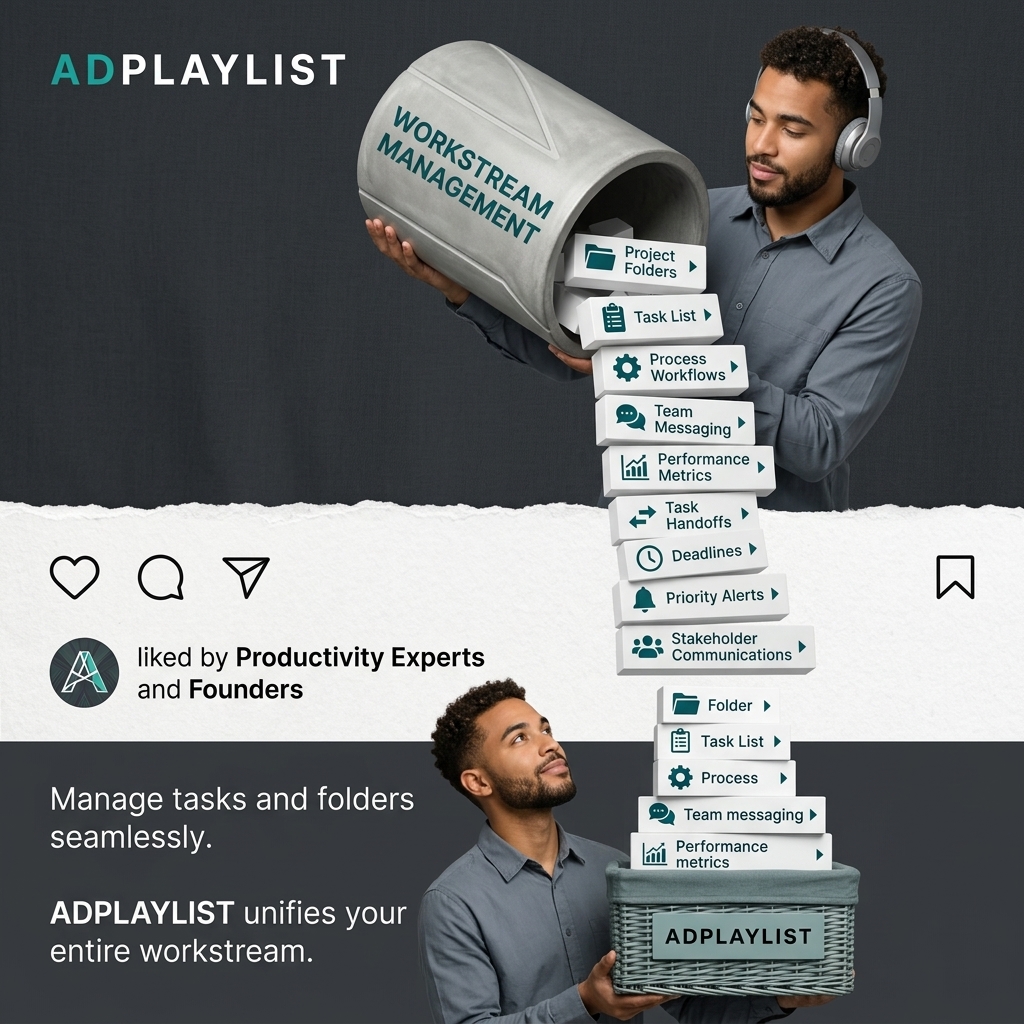
- Format: Visual metaphor pouring features into the product.
- Best for: SaaS tools that consolidate many apps or functions.
- Hook: The same person sending and receiving the stack.
- Reuse it: Turn your feature list into physical objects flowing into your product.
Available sizes
What is a feature callout ad?
A feature callout ad is a static image that shows a single product with short text labels pointing to its key features or benefits, usually joined to the product by thin lines. It explains several selling points at a glance without a long caption, which is why it's common for supplements, skincare, electronics and kitchenware.
See all feature callouts ads →Why this feature callouts ad works
- 01
Visual metaphor
Pouring features into one basket shows consolidation instantly.
- 02
Feature list as objects
Card labels list many features without a block of text.
- 03
Native social cues
The post strip and 'liked by' line add social proof.
- 04
Same person twice
Showing one man top and bottom suggests one user handling it all.
Full creative breakdown
Who this ad targets
This ad targets founders, team leads and operations managers aged 25 to 50 who juggle multiple tools for tasks, files and messaging. They want fewer apps and clearer workflows. They are comparing project management platforms and value social proof from productivity experts. Interest targeting is a good starting point, and lookalike audiences built from past purchasers are a strong next step once the ad has data.
Copywriting analysis
The copy is short and benefit-led, letting the cards do the feature work. 'Unifies your entire workstream' is a clear consolidation message. 'Liked by Productivity Experts and Founders' mimics social proof but is not a real metric, so it should be used carefully. The headline sets the emotional frame and the callouts handle the rational proof. Short labels are easy to scan in a feed, and each one removes a specific objection a buyer might have before clicking. Together, the words and visuals give the viewer one clear reason to click.
Visual design
A vertical flow of white cards cuts through the dark background, leading the eye from top to bottom. The torn paper strip adds a collage feel. Teal icons and the teal 'AD' in the logo add a consistent accent colour. The square 1:1 format keeps every element readable on mobile, and the clear hierarchy guides the eye from brand to message to product in a natural order.
How to adapt this template for your brand
- List the features of your project management tool and keep only the three to six buyers ask about most.
- Rewrite each feature as a two-to-four-word benefit label.
- Pair each label with a simple line icon or place it in a pill or card.
- Arrange the callouts around a clean hero image of the product or a person using it.
- Swap the callout order and test which benefit drives the best click-through rate.
Tips for saas ads on Meta
On LinkedIn, run this project management tool creative as single-image Sponsored Content targeted by job title and industry, and keep the intro text under 150 characters so it is not truncated. On Meta, use the same 1:1 file in Feed and crop a 4:5 version for mobile. Keep key text away from the edges, and open the primary text with the work problem the product solves.
About this creative
The creative has a dark charcoal background split by a torn paper strip styled like a social post. At the top, a man wearing headphones tips a large concrete pipe labelled workstream management, pouring out a tall stack of white cards with icons for project folders, task list, process workflows, team messaging, performance metrics, task handoffs, deadlines, priority alerts and stakeholder communications. At the bottom, the same man catches the cards in a woven basket labelled Adplaylist. The middle strip shows like, comment, share and save icons with a line saying liked by productivity experts and founders. As a feature callouts ad, it pairs a hero visual with short, scannable benefit labels. Each callout answers a buying question in a few words, so the viewer can grasp the value without reading a paragraph. Icons, pills and cards make the benefits feel concrete and easy to compare, which works well for audiences who are already weighing up options.
Meta ad · 1200 × 1200 · SaaS
Project Management Ad Template – Feature callouts Example
This project management ad template uses a feature callouts format to show a man pouring a stream of feature cards from a pipe into a branded basket. It is a strong reference for saaS tools that consolidate many apps or functions. Below: the copy, why it works and five steps to adapt it.
Added
All brand names and logos are property of their owners. Adplaylist is not affiliated with or endorsed by these brands.
Details
Ad copy
Primary text
Projects, tasks, messages and metrics, all in one place. Adplaylist unifies your entire workstream so nothing falls through the cracks.
Description
Tasks, folders and team messaging
On-image text
ADPLAYLIST | WORKSTREAM MANAGEMENT | Project Folders | Task List | Process Workflows | Team Messaging | Performance Metrics | Task Handoffs | Deadlines | Priority Alerts | Stakeholder Communications | Folder | Task List | Process | Team messaging | Performance metrics | liked by Productivity Experts and Founders | Manage tasks and folders seamlessly. | ADPLAYLIST unifies your entire workstream. | ADPLAYLIST (on basket)
Headline ideas for this template
- 1All your work, one basket.
- 2Stop juggling tools.
- 3Every task, file and message, unified.
- 4The only workspace you need.
- 5From scattered to sorted.
Meta image ad specs
| Placement | Ratio | Size (px) |
|---|---|---|
| Feed | 1:1 or 4:5 | 1080×1080 / 1080×1350 |
| Marketplace | 1:1 | 1200×1200 |
| Messenger inbox | 1:1 | 1200×1200 |
| Stories & Reels | 9:16 | 1080×1920 |
This template is 1:1. Request 4:5 or 9:16 to cover all placements.
Browse similar by tag