Key takeaways
- Format: Square product shot of the kiosk with a location CTA headline
- Best for: Driving store visits and kiosk recognition
- Hook: Sell yours at a kiosk near you
- Reuse it: Show your physical location or machine clearly with a near you CTA
Available sizes
What is a product shot ad?
A product shot ad puts the product itself at the centre of the frame, usually on a clean or styled background with little text. It works best when the packaging or product is distinctive enough to stop the scroll and the viewer already understands what it does.
See all product shot ads →Why this product shot ad works
- 01
Teaches recognition
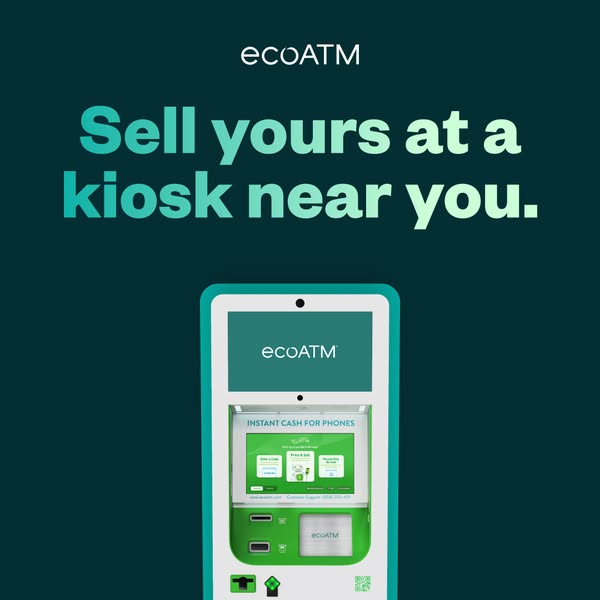
A clean, front-on view shows exactly what the kiosk looks like, so people spot it in stores.
- 02
Near you lowers effort
The headline promises convenience and implies a short trip, which removes friction.
- 03
Yours is personal
Using yours makes the viewer the owner of a valuable phone, and links back to earlier carousel cards.
- 04
Screen shows the process
The visible step panels on the kiosk screen hint at a simple, guided process.
Full creative breakdown
Who this ad targets
This ad targets US smartphone owners who have warmed up to the idea of selling their phone and just need to know where. It fits location-based campaigns around retail partners such as supermarkets, big-box stores and malls. It also works as retargeting for people who engaged with testimonial, stat or offer ads, and as the closing card of a carousel. Broad adult demographics fit, since the message is practical rather than lifestyle-led.
Copywriting analysis
The copy is a direct instruction with a location promise. Sell yours is short and assertive, and yours avoids repeating phone, which works well when the ad follows a carousel or related ads. At a kiosk near you introduces the format and the convenience in one phrase. The gradient treatment on the headline gives it weight and ties it to the brand palette. The kiosk's own screen text, Instant Cash for Phones, adds a second benefit line without cluttering the layout. The ad could be strengthened with a store finder or partner store names in the primary text.
Visual design
The layout is centred and symmetrical, with the logo at the top, a big two-line headline and the kiosk taking up the bottom half. The dark background makes the white and green kiosk pop. Showing the machine head-on and cropped at the bottom gives it an almost life-size presence on a phone screen. The teal frame around the kiosk echoes the headline gradient, and the green lower section adds a bright accent. The design is minimal so the product is unmistakable.
How to adapt this template for your brand
- Photograph your store, machine or location straight on and crop it to feel large.
- Write a short action headline with near you or a location cue.
- Use a brand gradient on the headline to tie it to your palette.
- Keep the logo small at the top and avoid extra elements.
- Pair it with location targeting and a Get Directions CTA.
Tips for recycling ads on Meta
Runs well in the Meta feed at 1:1 and can be cropped to 4:5 for extra mobile real estate. Keep the headline readable at thumbnail size and let the primary text carry the emoji benefit list. Use a Get Directions CTA with a store-traffic or reach objective targeted around kiosk locations. For Google Display or Performance Max, upload the same layout as a 1200×1200 square and pair it with a short 30-character headline that repeats the cash benefit.
About this creative
This square ad focuses entirely on the ecoATM kiosk. At the top, the ecoATM logo sits in white on the dark teal-green background. Below, a large bold headline in a teal-to-mint gradient reads Sell yours at a kiosk near you, spread over two lines. The bottom half shows the kiosk straight on: a white machine with a teal frame, a camera at the top, an ecoATM-branded upper screen and a bright green lower section. The main screen displays Instant Cash for Phones with three step panels, and below it are the slots and a tray area where phones are placed, plus a QR code at the bottom right. The kiosk is cropped at the bottom edge, filling the space and giving it scale. There is no person or tagline, so the ad reads as a clear, functional recognition piece. It also works as a likely closing card for the carousel, where yours refers back to the phones mentioned before.
Meta ad · 338 × 600 · Recycling
Product Shot Ad Template: Sell Yours at a Kiosk Near You
This square ecoATM ad puts the kiosk itself front and centre with a direct location CTA: sell yours at a kiosk near you. Bold gradient type and a clean front-on product shot make the machine recognisable. Use it as a template for local, store-visit product ads.
Added
All brand names and logos are property of their owners. Adplaylist is not affiliated with or endorsed by these brands.
Details
Ad copy
Primary text
Recycle your used phone with us. 📱 Get instant cash. 💵 Help the planet. 🌎 Find an ecoATM near you
Description
Find an ecoATM kiosk near you
On-image text
ecoATM | Sell yours at a kiosk near you. | Instant cash for phones
Headline ideas for this template
- 1Find an ecoATM kiosk near you
- 2Your nearest kiosk pays cash
- 3Look for the green kiosk in store
- 4Sell yours on your next shopping trip
- 5Instant cash for phones, nearby
Meta image ad specs
| Placement | Ratio | Size (px) |
|---|---|---|
| Feed | 1:1 or 4:5 | 1080×1080 / 1080×1350 |
| Marketplace | 1:1 | 1200×1200 |
| Messenger inbox | 1:1 | 1200×1200 |
| Stories & Reels | 9:16 | 1080×1920 |
This template is 1:1. Request 4:5 or 9:16 to cover all placements.
Browse similar by tag