Key takeaways
- Format: Premium dark-studio product shot with a two-line product name as the headline.
- Best for: Launching or re-promoting a design-led phone accessory to style-conscious buyers.
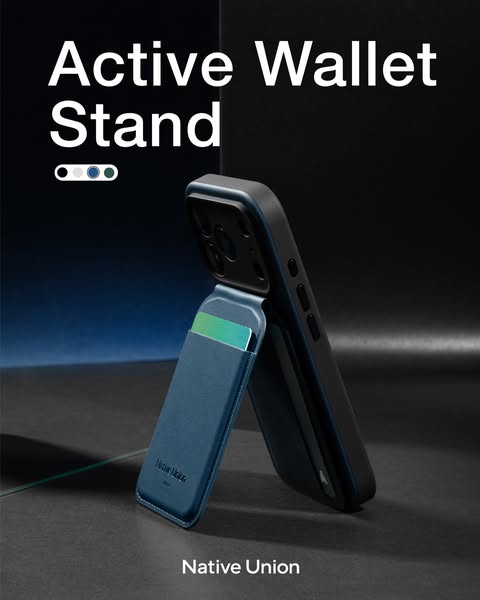
- Hook: The phone standing on its own wallet shows two functions in a single glance.
- Reuse it: Shoot your product in use against a dark gradient, add the name and colour dots, done.
Available sizes
What is a product shot ad?
A product shot ad puts the product itself at the centre of the frame, usually on a clean or styled background with little text. It works best when the packaging or product is distinctive enough to stop the scroll and the viewer already understands what it does.
See all product shot ads →Why this product shot ad works
- 01
One image, two benefits
The card sticking out shows storage and the upright phone shows the stand, so the viewer understands the product without reading copy.
- 02
Premium lighting signals quality
The dark backdrop and controlled blue glow position the accessory as a design object rather than a cheap add-on, supporting a higher price point.
- 03
Colour swatches invite choice
The small row of dots tells shoppers there is a colour for them, nudging them to tap through and pick one.
- 04
Minimal copy, maximum clarity
With only the product name on the image, nothing competes with the hero shot, which keeps the ad clean in a busy feed.
Full creative breakdown
Who this ad targets
The ad targets iPhone owners who use MagSafe and care about design, typically 25–45-year-old urban professionals who want to carry fewer things. They already own a quality case and are looking for a slim alternative to a bulky wallet, plus a way to prop their phone up for video calls, recipes or streaming. The premium styling suggests Native Union is aiming at buyers who value aesthetics and are willing to pay more than marketplace prices for a well-made accessory.
Copywriting analysis
The on-image copy is reduced to the product name, 'Active Wallet Stand'. That choice works because the name itself is descriptive: 'wallet' and 'stand' explain the two functions, while 'Active' adds energy and implies movement or everyday use. Splitting it over two lines gives the headline visual weight and makes it readable even on small screens. There is no price or discount, which keeps the tone premium and brand-led. The trade-off is that there is no explicit benefit or urgency, so the primary text and headline fields in the ad unit need to carry the 'why', for example by highlighting fewer things to carry or hands-free viewing. Adding a short benefit line could lift click-through for colder audiences.
Visual design
The layout follows a clear top-to-bottom hierarchy: headline top-left, colour swatches beneath, hero product in the centre-right and logo at the bottom. The dark charcoal palette with a cool blue accent light creates depth and makes the blue wallet pop. White text gives maximum contrast. The product is shot at a slight angle and low perspective, making the phone look tall and confident. Generous negative space around the product keeps the composition calm and premium.
How to adapt this template for your brand
- Photograph your product in use (not flat-lay) so its main function is visible at a glance.
- Use a dark gradient background with one accent colour that matches your product.
- Set the product name as a large two-line headline in a clean white sans-serif.
- Add small colour swatches under the headline if you sell multiple finishes.
- Place your logo at the bottom centre and keep the rest of the canvas empty.
Tips for phone accessories ads on Meta
On Meta, the 4:5 portrait size takes up maximum feed space on mobile, so it is ideal for Facebook and Instagram feeds. Because the image has no CTA, add a clear 'Shop Now' button and put a benefit in the primary text. For Stories and Reels, extend the background to 9:16 and keep the headline out of the top and bottom 250 px safe zones. Test the same shot in each colour as a carousel to let users swipe through options.
About this creative
This portrait ad from Native Union introduces the Active Wallet Stand, a magnetic card wallet that attaches to the back of an iPhone and folds out to act as a kickstand. The creative is shot in a dark, almost studio-noir setting: a charcoal backdrop with a subtle blue light gradient on the left and a soft reflection on the floor. The phone stands upright on the wallet, with a green-blue card peeking out of the slot to signal its storage function. The headline 'Active Wallet Stand' sits top-left in large white sans-serif type, followed by a small row of four colour swatches that hint at the available finishes. The Native Union logo is placed at the bottom centre in white. There is no price, offer or call to action on the image itself; the ad relies entirely on product desirability and premium styling to earn the click. It is a classic brand-led product shot.
Meta ad · 338 × 600 · Phone Accessories
MagSafe Wallet Stand Ad: Native Union Active Wallet Stand
This Native Union ad promotes the Active Wallet Stand, a magnetic card wallet that also works as a phone kickstand. It uses a dark, premium product-shot format with a bold two-word headline and colour swatches. Use it as a template for minimalist accessory launches on Meta feeds.
Added
All brand names and logos are property of their owners. Adplaylist is not affiliated with or endorsed by these brands.
Details
Ad copy
Primary text
Cards, phone and a hands-free stand – all in one slim magnetic wallet. Meet the Active Wallet Stand by Native Union. Snaps on, props up, comes in four colours.
Description
The magnetic wallet that doubles as a stand
On-image text
Active Wallet Stand | Native Union | (four colour swatches: black, white, blue, green)
Headline ideas for this template
- 1Your wallet, now a phone stand
- 2Carry less. Watch hands-free.
- 3Cards on the back, stand on demand
- 4The slimmest way to carry your cards
- 5Snap it on. Prop it up.
Meta image ad specs
| Placement | Ratio | Size (px) |
|---|---|---|
| Feed | 1:1 or 4:5 | 1080×1080 / 1080×1350 |
| Marketplace | 1:1 | 1200×1200 |
| Messenger inbox | 1:1 | 1200×1200 |
| Stories & Reels | 9:16 | 1080×1920 |
This template is 1:1. Request 4:5 or 9:16 to cover all placements.