Key takeaways
- Format: Listicle disguised as an iPhone Notes checklist.
- Best for: Explaining a simple onboarding process and capturing problem-aware searchers.
- Hook: 'How To Avoid Roaming Charges' frames the ad as a useful tip.
- Reuse it: Turn your product's setup steps into a native Notes checklist with a problem-led title.
Available sizes
What is a listicle ad?
A listicle ad presents the product's benefits or reasons to buy as a short numbered list, like an article headline ("5 reasons…"). The list format is easy to scan in a feed and lets one creative answer several objections at once.
See all listicle ads →Why this listicle ad works
- 01
Problem-led headline
Roaming charges are a pain point people actively search for, so the title attracts problem-aware travelers.
- 02
Native, familiar UI
The Notes app look makes the ad feel like personal advice rather than marketing.
- 03
Steps reduce friction
Showing just five easy steps proves that switching to an eSIM is quick and not technical.
- 04
Ticks imply progress
Yellow checkmarks suggest each step is already done, making the outcome feel effortless and achievable.
Full creative breakdown
Who this ad targets
This ad targets frequent and first-time international travelers aged 20–50 who are worried about roaming fees but unsure how eSIMs work. They are typically iPhone users who recognise the Notes app instantly, and like saving practical tips before a trip. It also appeals to budget-conscious backpackers, students and families planning holidays, who want clear, step-by-step reassurance before committing to a new way of getting mobile data abroad.
Copywriting analysis
The copy follows a classic how-to listicle structure. The headline 'How To Avoid Roaming Charges' is search-style phrasing that promises a solution to a familiar problem. Each checklist item starts with a simple verb or state: download, choose, pick, active, get connected. The steps double as the product's user journey, so the ad educates and sells at the same time. The final line 'Get connected from the moment you land' delivers the emotional payoff. A minor grammar slip, 'Active instantly', adds a human, notes-to-self feel.
Visual design
The design is almost entirely white space, which makes it stand out in colourful feeds. Native iOS Notes elements such as the yellow back arrow, toolbar icons and tick circles create instant familiarity. The highlighted, underlined title imitates a user's text selection, adding a handmade touch. The Airalo logo is the only branded element and its warm gradient picks up the yellow tones of the UI. Large, readable text ensures the checklist works on small screens.
How to adapt this template for your brand
- Write a 'How To' headline around the problem your product solves.
- Break your onboarding or usage into four to six short steps.
- Recreate the iPhone Notes UI with yellow ticks, toolbar and back link.
- Add your logo at the top and highlight the title like selected text.
- End the list with the emotional outcome, not just a feature.
Tips for travel esims ads on Meta
This format performs well as a static Story or Feed post on Meta and can also be animated so each tick appears in sequence for Reels. Use a 'Download' CTA and target users interested in travel or upcoming trips. Encourage saves in the primary text. Keep the full checklist above the bottom 20% of the frame. Test against an Android Keep-style variant for Android-heavy markets.
About this creative
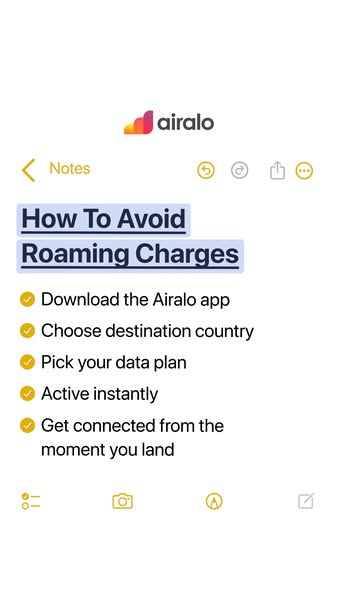
This minimalist Airalo creative imitates the iPhone Notes app almost perfectly. On a clean white background, the Airalo logo with its orange-to-red gradient mark sits at the top, above a yellow '< Notes' back link and the familiar undo, redo, share and more icons. The title 'How To Avoid Roaming Charges' appears in bold, underlined dark navy text with a light blue highlight, as if someone selected it. Below are five checklist items, each with a yellow tick: 'Download the Airalo app', 'Choose destination country', 'Pick your data plan', 'Active instantly' and 'Get connected from the moment you land'. The bottom toolbar shows the Notes icons for checklist, camera, markup and new note. There is no photo or person, just familiar UI and clear text. The ad feels like a screenshot someone shared with friends, giving it an educational and trustworthy tone while quietly explaining how simple the product is to use.
Meta ad · 338 × 600 · Travel eSIMs
Airalo 'How To Avoid Roaming Charges' Notes App Listicle Ad
This Airalo ad recreates an iPhone Notes page titled 'How To Avoid Roaming Charges', with five ticked steps that double as the product's onboarding flow. It is a Listicle format built for vertical Meta placements, ideal for turning a how-to tip into an educational, save-worthy ad.
Added
All brand names and logos are property of their owners. Adplaylist is not affiliated with or endorsed by these brands.
Details
Ad copy
Primary text
Saving this for your next trip? 📝 Avoiding roaming charges takes less than five minutes: download Airalo, choose your destination, pick a plan and you're online from the moment you land.
Description
Instant eSIM data for 200+ destinations
On-image text
airalo | Notes | How To Avoid Roaming Charges | Download the Airalo app | Choose destination country | Pick your data plan | Active instantly | Get connected from the moment you land
Headline ideas for this template
- 1How to avoid roaming charges in 5 steps
- 2Your pre-trip data checklist
- 3Roaming fees? Not on this trip
- 4Get online before you leave the airport
- 5The 2-minute travel data hack
Meta image ad specs
| Placement | Ratio | Size (px) |
|---|---|---|
| Feed | 1:1 or 4:5 | 1080×1080 / 1080×1350 |
| Marketplace | 1:1 | 1200×1200 |
| Messenger inbox | 1:1 | 1200×1200 |
| Stories & Reels | 9:16 | 1080×1920 |
This template is 1:1. Request 4:5 or 9:16 to cover all placements.