Key takeaways
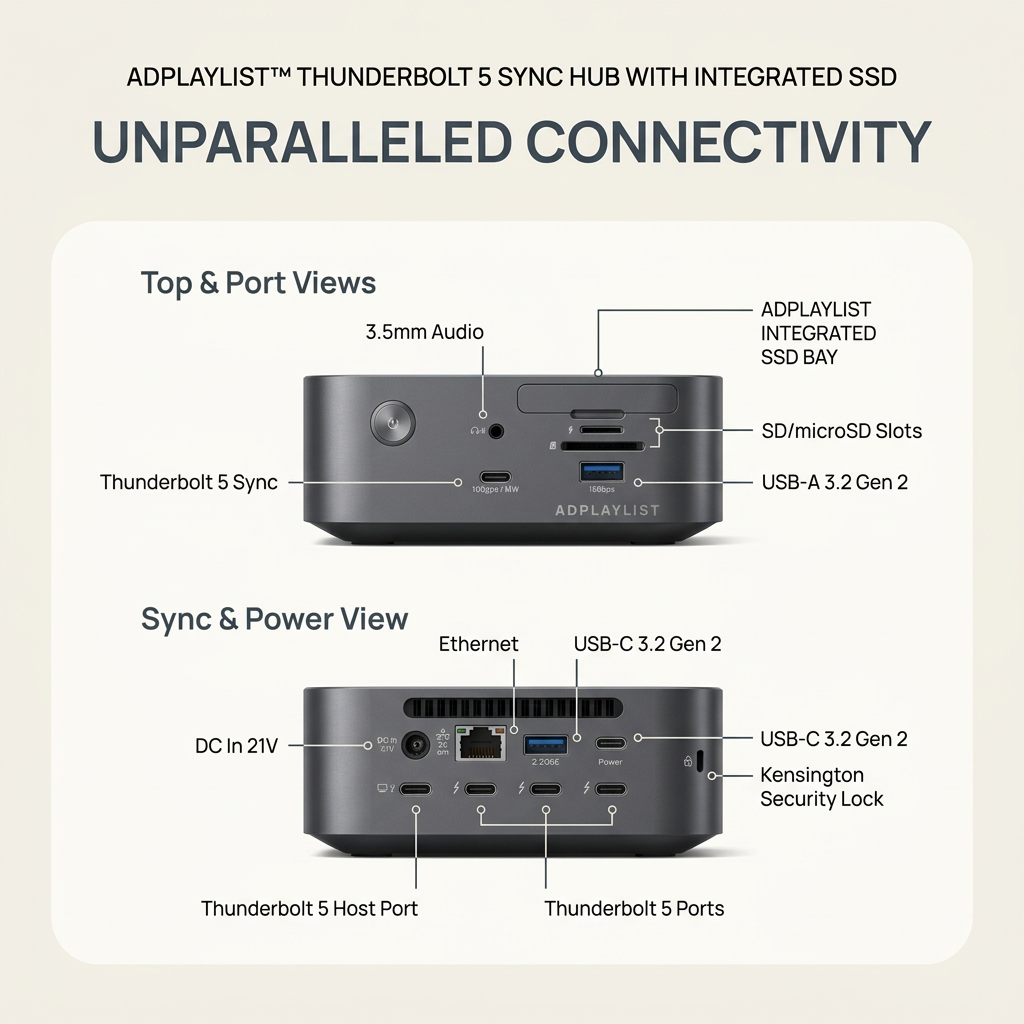
- Format: Technical spec diagram with every port labelled.
- Best for: Technical products power users scrutinize before buying.
- Hook: Every port and spec, clearly labelled.
- Reuse it: Show front and rear views with a callout for each port.
Available sizes
What is a feature callout ad?
A feature callout ad is a static image that shows a single product with short text labels pointing to its key features or benefits, usually joined to the product by thin lines. It explains several selling points at a glance without a long caption, which is why it's common for supplements, skincare, electronics and kitchenware.
See all feature callouts ads →Why this feature callouts ad works
- 01
Complete transparency
Labelling every port lets buyers confirm compatibility before purchasing.
- 02
Two clear views
Front and rear views cover the whole device with no ambiguity.
- 03
Professional styling
Clean, diagram-like design signals a serious, premium product.
- 04
Strong category claim
'Unparalleled Connectivity' sets a confident benchmark.
Full creative breakdown
Who this ad targets
Power users, creative professionals, developers and IT buyers aged 25–50 who run multi-monitor or high-data desk setups and need extensive, fast connectivity. They care about Thunderbolt speeds, port variety and build quality, and they read spec sheets closely before buying. The professional, detailed presentation makes the ad especially suitable for LinkedIn and B2B audiences, including teams standardizing on docking solutions.
Copywriting analysis
The headline, “Unparalleled Connectivity,” is a bold category claim that suits a flagship product, though it should be backed by the spec list. The product name specifies Thunderbolt 5 and an integrated SSD, two standout features. The callout labels are precise and technical, listing exact port types and standards like USB-C 3.2 Gen 2 and Thunderbolt 5, which is exactly what power users want. The copy is comprehensive; the primary text should add real-world benefits, such as how many displays it drives and transfer speeds, plus pricing.
Visual design
The layout is a clean technical diagram, with two device views stacked in a rounded white panel against the cream background. Thin callout lines connect each label to its port without crowding. The dark grey hub contrasts with the light panel, keeping focus on the hardware. Section labels, “Top & Port Views” and “Sync & Power View,” organize the information. The professional, uncluttered styling conveys precision and quality.
How to adapt this template for your brand
- Show front and rear views of your product.
- Label every port or feature with a thin callout line.
- Group the views with clear section headers.
- Lead with a confident category claim.
- Add real-world benefits and specs in the primary text.
Tips for saas & tech ads on Meta
Strong for LinkedIn and Meta Feed targeting professionals and power users. On LinkedIn, target creative, developer and IT roles. For Meta, target tech, productivity and content-creation interests. Back up 'unparalleled' with the spec list and real benefits. For Reels, pan across the ports as each is named. Put display support, transfer speeds and pricing in the primary text for spec-focused buyers.
About this creative
This square ad for a Thunderbolt 5 docking hub uses a cream background and a technical, diagram-style layout. At the top, small text names the ADPLAYLIST Thunderbolt 5 Sync Hub with integrated SSD, above a large dark headline, “Unparalleled Connectivity.” Below, a rounded white panel contains two views of the dark grey hub. The upper “Top & Port Views” shows the front, with labelled callouts for 3.5mm audio, an integrated SSD bay, SD and microSD slots, USB-A 3.2 Gen 2, a Thunderbolt 5 sync port and a power button. The lower “Sync & Power View” shows the rear, with labels for DC In 21V, Ethernet, two USB-C 3.2 Gen 2 ports, a Kensington security lock, a Thunderbolt 5 host port and multiple Thunderbolt 5 ports. Thin callout lines connect each label to its port. The clean, precise presentation gives power users a complete overview of the hub's extensive connectivity in one clear, professional layout.
Meta ad · 1200 × 1200 · SaaS & Tech
Docking Hub Ad: A Full Port Diagram
This feature-callout ad is a clean spec diagram of a Thunderbolt 5 docking hub, showing front and rear views with every port labelled, from the SSD bay to Thunderbolt 5 ports. Use this template for technical products where power users want to verify every port and spec before buying.
Added
All brand names and logos are property of their owners. Adplaylist is not affiliated with or endorsed by these brands.
Details
Ad copy
Primary text
One hub for your entire desk setup. The ADPLAYLIST Thunderbolt 5 Sync Hub adds an integrated SSD bay, Thunderbolt 5 ports, Ethernet, USB-C and USB-A, SD slots and more, so a single connection powers and links everything.
Description
Thunderbolt 5 hub with integrated SSD.
On-image text
ADPLAYLIST™ Thunderbolt 5 Sync Hub with Integrated SSD | Unparalleled Connectivity | Top & Port Views | 3.5mm Audio | ADPLAYLIST Integrated SSD Bay | SD/microSD Slots | USB-A 3.2 Gen 2 | Thunderbolt 5 Sync | Sync & Power View | DC In 21V | Ethernet | USB-C 3.2 Gen 2 | Kensington Security Lock | Thunderbolt 5 Host Port | Thunderbolt 5 Ports
Headline ideas for this template
- 1Every Port You Need, in One Hub
- 2Thunderbolt 5 Speed, Built-In SSD
- 3Power Your Whole Desk From One Hub
- 4Connect Everything, Compromise Nothing
- 5The Hub Power Users Have Been Waiting For
Meta image ad specs
| Placement | Ratio | Size (px) |
|---|---|---|
| Feed | 1:1 or 4:5 | 1080×1080 / 1080×1350 |
| Marketplace | 1:1 | 1200×1200 |
| Messenger inbox | 1:1 | 1200×1200 |
| Stories & Reels | 9:16 | 1080×1920 |
This template is 1:1. Request 4:5 or 9:16 to cover all placements.
Browse similar by tag