Key takeaways
- Format: Product shot: a phone mockup showing the app in action.
- Best for: Pet tech apps and connected devices.
- Hook: Catch every detail, no matter where you go.
- Reuse it: Swap in your own app screen and keep the white space and bold headline.
Available sizes
What is a product shot ad?
A product shot ad puts the product itself at the centre of the frame, usually on a clean or styled background with little text. It works best when the packaging or product is distinctive enough to stop the scroll and the viewer already understands what it does.
See all product shot ads →Why this product shot ad works
- 01
Shows the experience
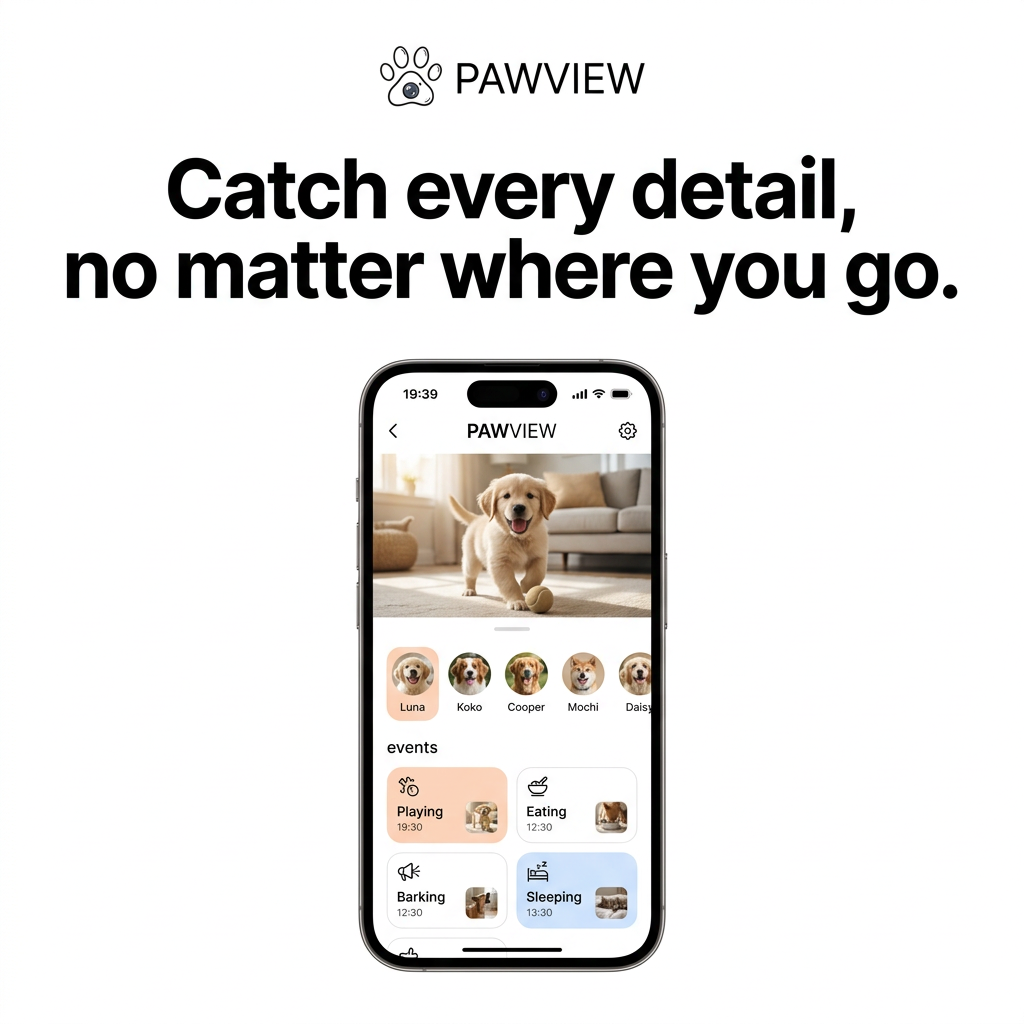
Seeing a happy puppy live on screen lets owners imagine checking in on their own pet from work.
- 02
Event tiles explain features
Playing, eating, barking and sleeping tiles show smart detection without a feature list.
- 03
Multi-pet profiles
Five named avatars signal that the app handles households with several pets.
- 04
Tech-brand aesthetic
White space and heavy type borrow credibility from big consumer tech launches.
Full creative breakdown
Who this ad targets
Working pet owners and frequent travellers, mostly 25–45, who feel guilty or anxious leaving their dog or cat home alone. They are early adopters of smart home devices and used to app-based services. Owners of new puppies, multi-pet households and people with separation-anxious pets are particularly interested in knowing when their pets bark, eat or sleep while they are away.
Copywriting analysis
The headline is benefit-led and emotional rather than technical. "Catch every detail" promises completeness, while "no matter where you go" addresses the core worry of being away from home. There are no specs, prices or feature claims; the interface copy (event names and timestamps) does the explaining. Pet names like Luna and Cooper make the screen feel lived-in and personal. The simplicity keeps the message clear, but adding a key differentiator (such as AI alerts) could strengthen it. Overall, the copy is short enough to read in a second.
Visual design
Pure white background, black type and a black phone frame create a premium, high-contrast look. The headline is huge and tightly kerned, similar to Apple marketing. The phone is centred, making the UI the focal point. Inside the screen, soft peach and blue tiles add gentle colour and highlight active events. Warm living room tones in the video feed add emotion to an otherwise clean, technical design.
How to adapt this template for your brand
- Write a short emotional headline about the benefit of your app.
- Design a realistic app screen that shows your key features in use.
- Use a warm, appealing photo or video still inside the screen.
- Place the phone mockup centred on a plain white background.
- Add a small logo above the headline and keep everything else minimal.
Tips for pets ads on Meta
Use as an app-install ad on Meta and in Google App campaigns. For video, show a screen recording of notifications popping up while the owner is at work. Make sure the mockup doesn't use another brand's device branding in a misleading way. Test versions featuring cats and multiple pets to broaden appeal, and add an App Store rating for social proof.
About this creative
A crisp, Apple-style ad for Pawview, a pet camera app. The background is pure white. At the top, a small paw logo with a camera lens in the pad sits next to the Pawview wordmark. Below it, a large bold black headline spans two lines: catch every detail, no matter where you go. The lower two-thirds show a single black iPhone mockup. On screen, the app header reads Pawview with back and settings icons. A live video panel shows a golden retriever puppy trotting across a bright living room carpet with a tennis ball. Beneath, a horizontal row of circular pet avatars is labelled Luna, Koko, Cooper, Mochi and Daisy, with Luna highlighted in peach. An events section shows four tiles with icons, times and thumbnails: playing (peach), eating, barking and sleeping (blue). The design is minimal, high-contrast and lets the product UI take centre stage.
Meta ad · 1200 × 1200 · Pets
Pet Camera App Ad: Clean Phone Mockup Template
This Pawview ad places a single iPhone mockup on a white background under a bold headline. The screen shows a live feed of a golden retriever puppy, a row of pet profiles and colour-coded event tiles. It is a product shot format for pet tech and app brands that want the interface itself to sell the product.
Added
All brand names and logos are property of their owners. Adplaylist is not affiliated with or endorsed by these brands.
Details
Ad copy
Primary text
Missing them while you're out? Pawview lets you watch your pet live and see every moment that matters: when they play, eat, bark or nap. All your pets, one simple app. Catch every detail, no matter where you go.
Description
Live pet camera with smart event alerts
On-image text
PAWVIEW | Catch every detail, no matter where you go. | (app screen) PAWVIEW | Luna | Koko | Cooper | Mochi | Daisy | events | Playing 19:30 | Eating 12:30 | Barking 12:30 | Sleeping 13:30
Headline ideas for this template
- 1Your Pet, Live in Your Pocket
- 2Know When They Bark, Eat or Nap
- 3Never Miss a Moment With Your Pet
- 4Check In on Every Pet, Anytime
- 5The Smart Way to Watch Your Pets
Meta image ad specs
| Placement | Ratio | Size (px) |
|---|---|---|
| Feed | 1:1 or 4:5 | 1080×1080 / 1080×1350 |
| Marketplace | 1:1 | 1200×1200 |
| Messenger inbox | 1:1 | 1200×1200 |
| Stories & Reels | 9:16 | 1080×1920 |
This template is 1:1. Request 4:5 or 9:16 to cover all placements.
Browse similar by tag