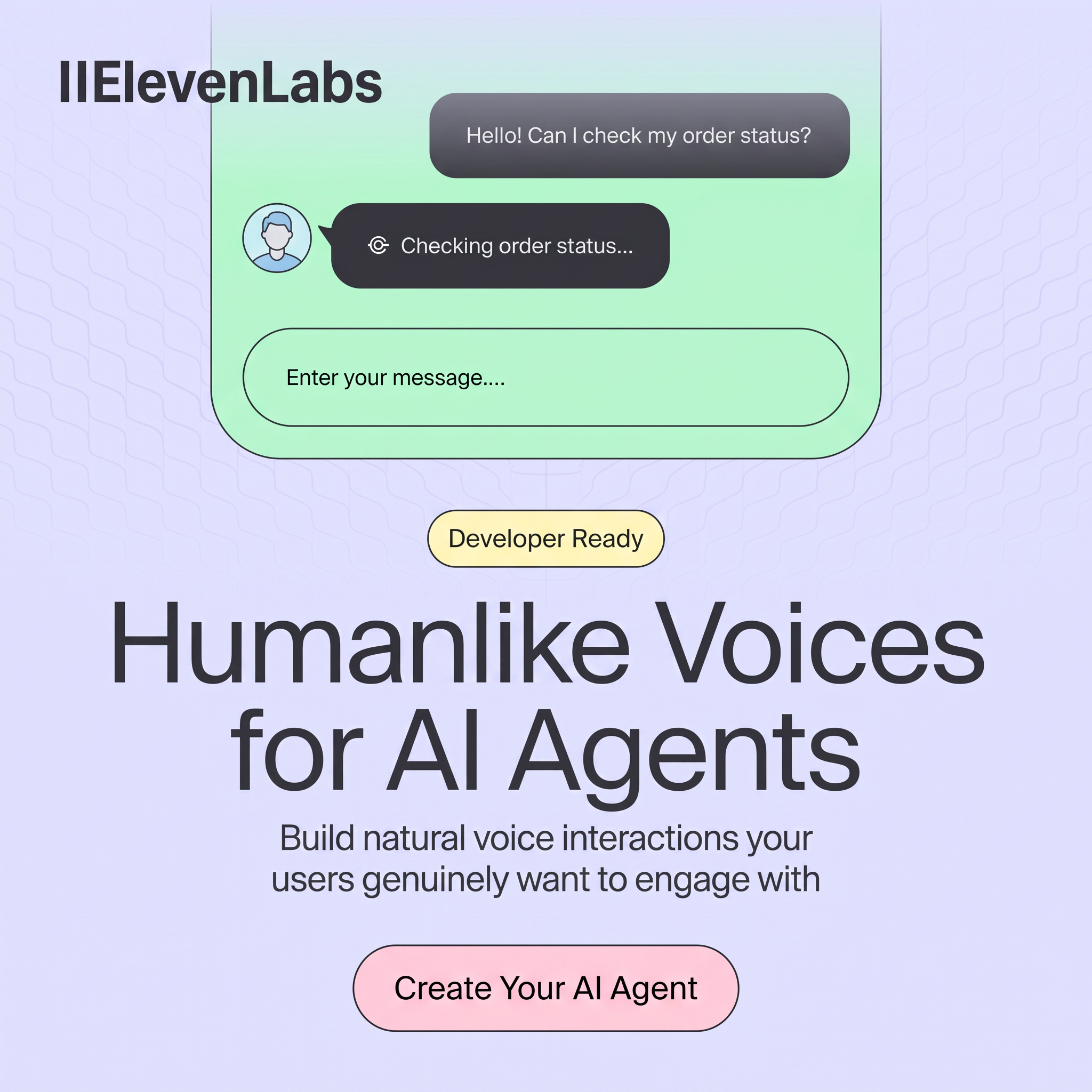
Key takeaways
- Format: Product UI mockup with headline and CTA
- Best for: SaaS, AI and developer tool brands
- Hook: A real chat use case: checking an order status
- Reuse it: Replace the chat with your own UI moment, keep the badge, headline and pill button
Available sizes
What is a product shot ad?
A product shot ad puts the product itself at the centre of the frame, usually on a clean or styled background with little text. It works best when the packaging or product is distinctive enough to stop the scroll and the viewer already understands what it does.
See all product shot ads →Why this product shot ad works
- 01
Shows the product working
A short chat demo makes an abstract AI product easy to picture.
- 02
Familiar use case
Order status questions are a common support task, so businesses instantly see the value.
- 03
Badge for the right audience
Developer Ready tells technical buyers this is something they can build with today.
- 04
Soft pastels stand out
Lavender, mint and pink feel friendly and differ from the dark, techy look of many AI ads.
Full creative breakdown
Who this ad targets
This ad targets developers, product managers and technical founders who are building AI agents, chatbots or voice assistants, as well as customer experience leaders looking to automate support. They care about voice quality, ease of integration and user experience. The order status example also speaks to e-commerce and service businesses with high support volume who want to reduce call centre costs.
Copywriting analysis
The headline is short and keyword-rich: Humanlike Voices for AI Agents. It tells the viewer exactly what the product does and who it is for. The subline adds a user benefit, interactions your users genuinely want to engage with, which hints at a common pain point: robotic, annoying bots. Developer Ready is a two-word qualifier that filters the audience. The chat copy is everyday language that shows the use case without explanation. The CTA, Create Your AI Agent, is action-led and promises a hands-on start.
Visual design
The layout stacks product UI on top and message below, with everything centred. A mint chat window and dark bubbles create a clear focal point. The lavender background with subtle waves hints at sound without using literal audio icons. Large, clean sans-serif type keeps it modern and readable. The yellow badge and pink button add playful accents and draw the eye down to the CTA.
How to adapt this template for your brand
- Pick one common task your product handles and show it as a simple UI moment.
- Add a small badge that names your target user, such as Developer Ready or For Teams.
- Write a keyword-led headline that says what the product does.
- Add one subline with the user benefit.
- Finish with a pill-shaped CTA that starts the trial or sign-up.
Tips for saas & tech ads on LinkedIn
On LinkedIn, target developers, engineering leads and CX managers, and link to a docs or quickstart page. On Meta, use interest targeting around AI and software development, and test a video version where the chat plays out with real audio. For Google display, keep the headline and CTA, and simplify the UI so it reads at smaller sizes. Track sign-ups, not just clicks, to judge performance.
About this creative
This square ad for ElevenLabs promotes its voice technology for AI agents. The background is a soft lavender with a faint wavy pattern. The ElevenLabs logo sits in the top left in dark bold type. Across the top, a mint green phone-like panel shows a simple customer service conversation: a user bubble asks to check order status, and an agent bubble with a small avatar replies that it is checking. An empty input field with the placeholder Enter your message completes the interface. Below it, a pale yellow pill badge reads Developer Ready. The main headline, Humanlike Voices for AI Agents, is set in large dark sans-serif type across two lines, followed by a short subline about building natural voice interactions users want to engage with. A pink pill button at the bottom says Create Your AI Agent. The ad shows a real use case and keeps the message focused on developers.
LinkedIn ad · 1200 × 1200 · SaaS & Tech
AI SaaS Ad Template: ElevenLabs Humanlike Voices Ad
This ElevenLabs ad shows a simple chat interface above a large headline and a pill CTA. It is a clean template for SaaS and AI brands that want to show the product in action, speak to developers and drive sign-ups on LinkedIn, Meta or display placements.
Added
All brand names and logos are property of their owners. Adplaylist is not affiliated with or endorsed by these brands.
Details
Ad copy
Primary text
Give your AI agents a voice people actually want to talk to. With ElevenLabs, developers can build natural, low-latency voice interactions for support, sales and more. Start building your first AI agent today.
Description
Developer-ready voice AI for natural conversations.
On-image text
ElevenLabs | Hello! Can I check my order status? | Checking order status... | Enter your message.... | Developer Ready | Humanlike Voices for AI Agents | Build natural voice interactions your users genuinely want to engage with | Create Your AI Agent
Headline ideas for this template
- 1Give your AI agent a real voice
- 2Build voice agents in minutes
- 3Support calls that sound human
- 4The voice layer for your AI product
- 5Stop sounding like a robot
Meta image ad specs
| Placement | Ratio | Size (px) |
|---|---|---|
| Feed | 1:1 or 4:5 | 1080×1080 / 1080×1350 |
| Marketplace | 1:1 | 1200×1200 |
| Messenger inbox | 1:1 | 1200×1200 |
| Stories & Reels | 9:16 | 1080×1920 |
This template is 1:1. Request 4:5 or 9:16 to cover all placements.
Browse similar by tag